Best Fitbit Alternative for Calorie Counting in 2026 (After Google Health Dropped Food Logging)
Google Health dropped Fitbit's calorie budget and recipes. Keep your Fitbit, move food logging to an app that actually works — here's how to switch.
- Published
- 7 min read
- 7 min read
TL;DR When Google rebranded the Fitbit app to Google Health in May 2026, it retired several food-logging tools many users relied on — most notably the dynamic "calories left today" budget that auto-adjusted to your activity, plus recipes — while some logging moved toward Google Health Premium. The good news is that you can keep your Fitbit device and its activity data, and move food logging to a dedicated calorie app. This guide explains what changed, what to look for in a replacement, and how to switch without losing your data flow.
Table of Contents
- What changed: why Fitbit/Google Health stopped working for calorie counting
- The features Fitbit users actually lost (or saw changed)
- You don't have to ditch your Fitbit device
- What to look for in a Fitbit alternative for calorie counting
- Where Fitia fits as a Fitbit calorie-counting replacement
- FAQ
What changed: why Fitbit/Google Health stopped working for calorie counting
In May 2026, Google began automatically converting the Fitbit app into the new Google Health app, with the rollout starting May 19. Google described it as a "fully redesigned and improved experience", but for people who used Fitbit to count calories, the update retired several long-standing food-logging tools. Most significantly, Fitbit's Food Plans feature, which automatically adjusted your daily calorie budget based on your activity, is no longer supported; you can still set a calorie target manually, but the dynamic, activity-based budget is gone.
Premium users also lost access to Recipes, and many users report a stripped-down food log and missing custom foods after the switch. Google has said data tied to removed features will only be downloadable until July 15, 2026, after which it begins deleting it, so if you relied on Fitbit for calorie tracking, it's worth exporting your history and lining up a replacement now.
The features Fitbit users actually lost (or saw changed)
Based on Google's official documentation and user reports as of late May 2026, the affected features include:
- Dynamic calorie budgeting. The biggest loss. Fitbit's "Food Plans" automatically adjusted your daily calorie target based on your activity; Google has confirmed this is retired. You can still set a manual calorie and macro target, but it no longer flexes with how active you are.
- Recipes. Confirmed gone — Google's help page states that for Premium users, recipes are no longer available.
- Custom foods (in flux). Custom food creation was missing or broken at launch, and many users reported a near-empty food log. Google has since said the ability to add, view, and create custom foods is among the fixes it's rolling out, so this one is actively changing and worth checking before you rely on it.
- A complete food database (user-reported). Many users described the new app's food database as incomplete at launch, making quick logging difficult. This appears tied partly to the rollout and the custom-food issues above.
- Some logging behind Premium / the AI coach. At launch, several newer logging paths (like multimodal photo/voice logging via the Google Health Coach) sat behind Google Health Premium, frustrating users who'd had free functionality. Google has since opened parts of the AI coach's preview more broadly, so exactly what's free is also shifting.
Separately (though not part of this app update), Fitbit is also retiring its web dashboard (browser-based logging), pushing everything into the mobile app.
The throughline is that your Fitbit's activity tracking still works — steps, heart rate, sleep, calories burned. What broke is the calorie-counting system layered on top of it. That's why, for most people, the fix isn't a new device but a new place to log food.
You don't have to ditch your Fitbit device
The cleanest solution for most people isn't replacing the hardware; it's pairing the Fitbit device with a dedicated calorie-counting app that can receive your activity data.
On Android, that bridge is Health Connect. A calorie app that integrates with Health Connect can read the activity and calories-burned data your Fitbit syncs there, then use it to build your daily food target, restoring the dynamic "calories in vs. calories out" loop you lost, without abandoning your tracker.
What to look for in a Fitbit alternative for calorie counting
Choose your replacement by whether it restores the specific things you lost. Use this checklist:
- Activity sync (Health Connect). So your Fitbit's calories-burned data still flows in and informs your daily target.
- Dynamic, adjusting calorie goals. A target that recalculates based on your activity and progress.
- Custom foods and saved recipes. So you can rebuild your home-cooked meal library and log it in one tap.
- A verified, complete food database. The fix for the "I can't find my food" problem — ideally a database checked by nutrition professionals rather than crowd-sourced.
- A usable free tier. If you resent losing a free feature to a paywall, prioritize an app that gives you real functionality for free.
- Fast logging you'll actually sustain. Barcode, voice, photo, or quick text entry, so daily logging is frictionless.
Several apps can replace what you lost — MyFitnessPal, Cronometer, and Lose It! among them. But today we're presenting the one we're confident will get you covered: the one that checks every box above for your goals and your daily routine.
Where Fitia fits as a Fitbit calorie-counting replacement
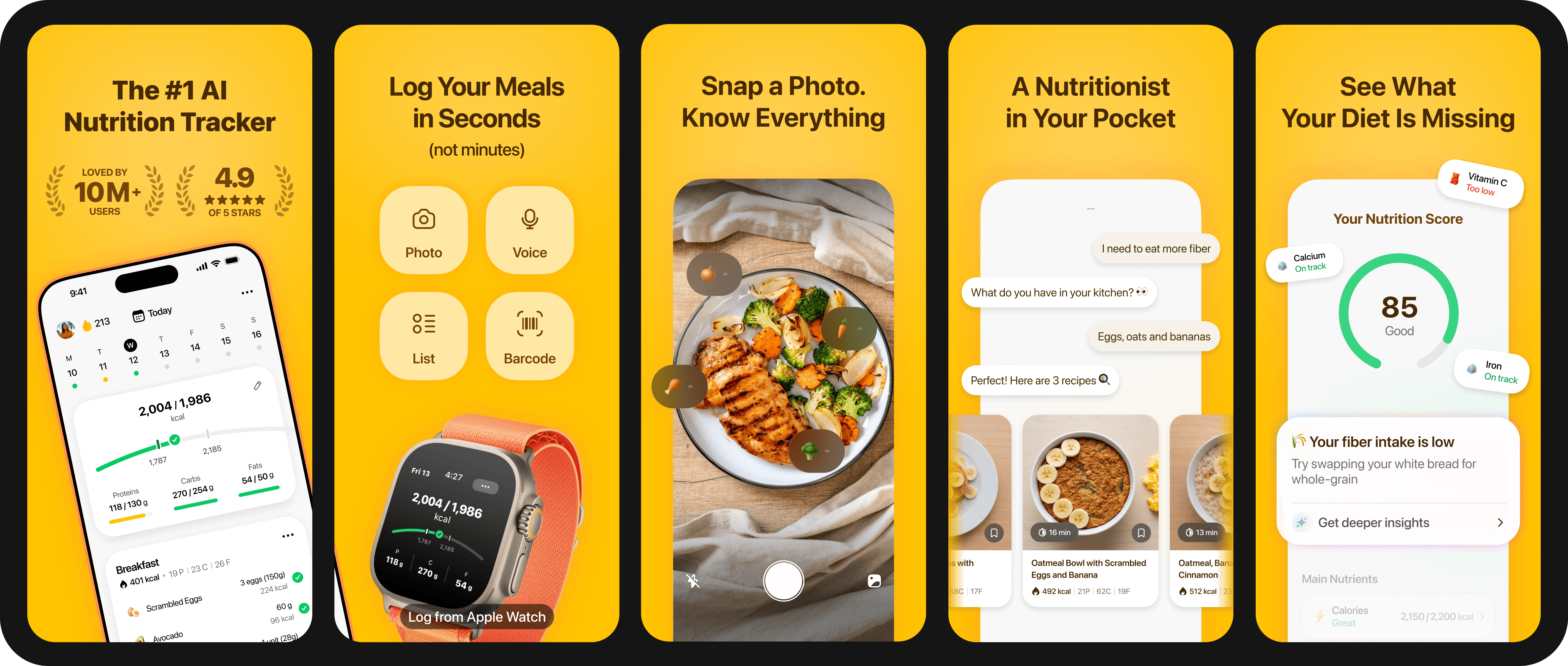
If you're looking for a single app that restores the specific features Google Health took away, Fitia maps directly onto the checklist above:
- It syncs with your Fitbit activity via Health Connect (Android) or, on iOS, through Apple Health using a third-party bridge app — so the calories your Fitbit burns still feed your daily numbers.
- It sets a dynamic calorie and macro target based on your weight, activity, and goal, and adjusts over time as you progress, restoring the "calories left today" loop.
- It lets you create custom foods and save homemade recipes for one-tap repeat logging — the home-cook feature users specifically miss.
- Its food database is verified — every entry validated by an internal algorithm and reviewed by a nutrition professional, which directly addresses the "incomplete database" complaint.
- It has a genuinely usable free tier, plus fast logging by barcode, so daily tracking stays low-friction. And if you go Premium, you unlock photo logging, full voice and text logging, a 24/7 Nutrition Coach, and — most importantly — full meal planning, so you never have to ask "what should I eat?" again.
In other words, you keep the Fitbit on your wrist for activity, and Fitia becomes the food-logging and calorie-budget layer that Google Health stopped providing.
Want to rebuild your calorie tracking in one place? You can start Fitia's free trial and connect it to your Fitbit data through Health Connect in seconds.
FAQ
What's the best Fitbit alternative for calorie counting in 2026?
The best replacement is a dedicated calorie app that syncs with your Fitbit's activity data through Health Connect (Android) and restores what Google Health changed: a dynamic, activity-based calorie budget, recipes, and a complete, verified food database. You keep the Fitbit device and only replace the food-logging app.
Did Fitbit really remove calorie counting?
After the May 2026 Google Health rebrand, users report losing the dynamic "Food Plans" calorie budget, recipes, and the web dashboard, with custom-food logging disrupted at launch and some functions moved toward Google Health Premium. You can still set a manual calorie target, and activity tracking remains.
Do I need to buy a new fitness tracker?
No. Your Fitbit still tracks steps, heart rate, sleep, and calories burned. You only need a new app for food logging, connected to your Fitbit data via Health Connect (Android).
Can I keep using my Fitbit with a different calorie app?
Yes. Apps that support Health Connect (Android) or Apple Health (iOS) can read your Fitbit activity and use it to set your daily calorie target. Note that on iOS, Fitbit data usually needs a bridge app (like Health Sync) to reach Apple Health.
How do I move my custom foods and recipes?
There's no automatic transfer, but you don't need one — re-create the 10–15 foods and recipes you log most often in your new app. They typically cover the majority of your daily logging, and saved recipes make repeat entries one tap.
You may also be interested in: Best Meal Planning Apps for 2026: Save Money, Reduce Waste, and Hit Your Macros — with your tracking back in place, a good meal planner takes care of the rest.
Related articles
 Fat Loss
Weight Loss Calorie Chart (2026): How Many Calories to Eat by Body Weight, Sex, and Activity
See how many calories to eat to lose weight, with simple charts by body weight and activity, plus why your target changes as you go.
Read article
Best Calorie Counter App for Muscle Gain in the US (2026): 4 Apps Compared for Lifters
The 4 best calorie counter apps for US lifters in 2026, compared on macros, database, adaptation, and meal planning.
Read article
Best Online Nutrition Coach in the US (2026): What to Look For Before You Pay
Online nutrition coaching in the US 2026: three tiers, what the research says, and the red flags to spot before you pay for an app or coach.
Read article